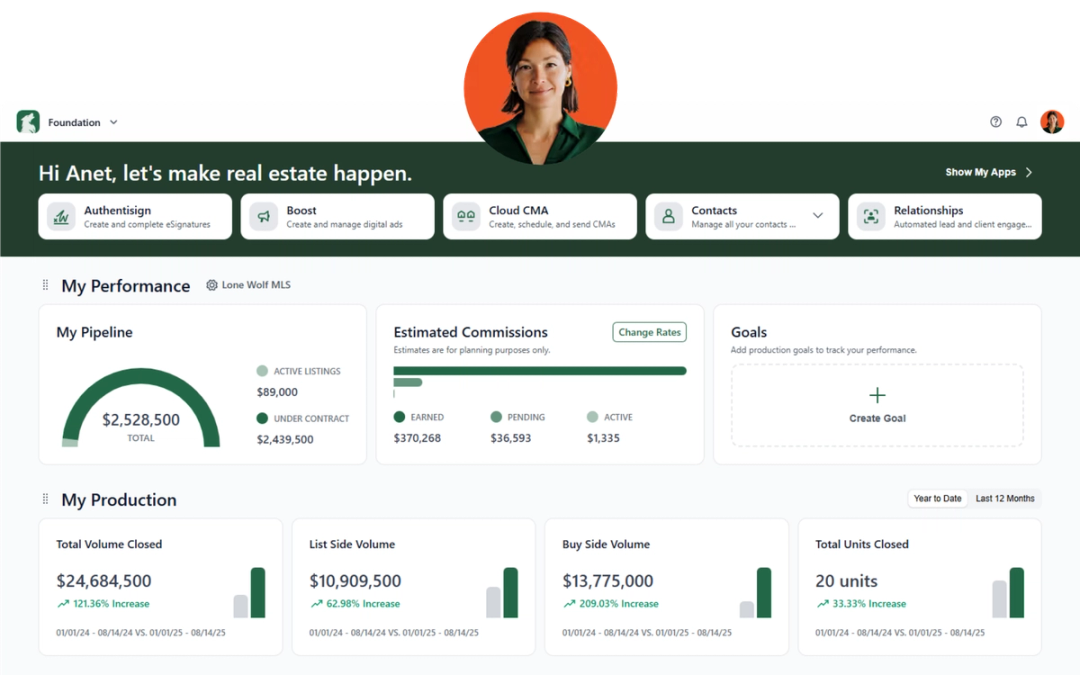
We’re always looking for ways to make Lone Wolf tools easier to use, more flexible, and more helpful in your day-to-day business. Here’s what’s new across Front Office.
Front Office
Explore the latest enhancements designed to give you more control over your website, simplify everyday tasks, and help your brokerage work more efficiently.
NEW: Website Builder 3.0
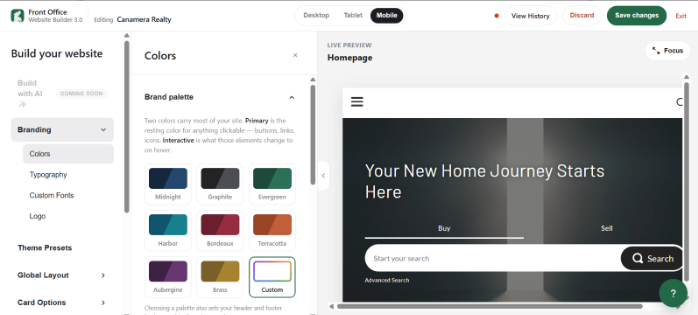
Website Builder 3.0 introduces a new visual editor that lets you design and update your website with a real-time preview of how it will look on desktop and mobile. Every edit appears instantly, and your changes won't go live until you select Save changes.
Customize your website's branding, including colors, typography, and logos; global layouts, including headers, navigation, and footers; homepage sections; property and agent cards; menus; calls to action; and social media elements.
How to access it: Go to Website > Website Builder > Builder NEW!
Brokerages created on or after October 1, 2026, have Website Builder 3.0 enabled by default. Existing users with Website Builder access will be upgraded automatically. If you don't have access yet, contact your Implementation Specialist or the Front Office Support team.
Why it matters:
Create a website that reflects your brokerage's brand without guessing how changes will look once published. The live preview makes it easier to fine-tune your design, maintain a consistent look across desktop and mobile, and publish updates when you're ready.
NEW: Embed videos in development content blocks
You can now embed YouTube videos directly into content blocks on your development pages. Previously, videos could only be added through the development carousel.
How to access it: Go to Developments > Select a development > Content Blocks.
Why it matters:
Give prospective buyers a richer view of your developments by adding video wherever it best supports your content. Showcase properties, highlight amenities, and bring your marketing pages to life beyond the carousel.
NEW: More flexible website page layouts
Two enhancements give you greater control over how content appears on your website.
- Three-column search results: Display property search results in up to three columns on larger screens. Go to Website > Website Builder > Page Designer > Search Page to update the layout.
- Custom widget ordering: Choose between Pre-Configured Order, which lets you drag and drop widgets into your preferred sequence, and Alphabetical Order. You can also add multiple Custom Widget elements to organize content across different sections. Find these options under Settings > Website Builder > Page Design Options > Homepage > Custom Widget.
Why it matters:
Make better use of website space and create a browsing experience that fits your audience. A three-column layout helps visitors scan more listings at once, while custom widget ordering lets you prioritize the content that matters most to your brokerage.
NEW: Organize brokerage contacts with company tags
Company Tags are now built in, giving your brokerage a shared way to organize contacts. Unlike personal tags, which are visible only to the assigned agent, Company Tags are available to brokers, admins, office managers, and others across your brokerage.
You can apply Company Tags when editing a contact by using the Company Tags section. These tags can also be used to build marketing lists and filter contacts.
Why it matters:
Keep contact organization consistent across your brokerage. Shared tags make it easier for teams to segment audiences, create targeted marketing lists, and find the right contacts without relying on individual agents' personal tagging systems.
NEW: Standardized agent profile fields
Admins now have more control over agent profile information. Office address and phone fields can use dropdown options populated from existing brokerage data, and access to the Primary Office field can be restricted to admins.
Why it matters:
Reduce manual entry errors and keep agent profiles consistent across your brokerage. Using standardized information helps maintain accurate records and makes it easier to manage agent details as your organization changes.
NEW: More marketing controls for brokers and admins
Two new enhancements give brokerage leaders greater control over marketing templates and contact lists.
- Template controls: Restrict agents from creating or editing marketing templates so they can use only the templates you've made available. You can also save templates as drafts and publish them when they're ready.
- Hide removed contacts: Hide contacts that have been removed from a marketing list to keep your view focused on active members. Removed contacts aren'tdeleted and can be displayed again at any time.
Manage marketing lists under Marketing > Marketing Lists.
Why it matters:
Maintain brand consistency while giving agents access to approved marketing resources. Draft templates let admins prepare campaigns in advance, and hiding removed contacts makes marketing lists easier to manage without permanently losing contact records.
NEW: Simplified SMS Business Profile setup
SMS Business Profile setup is now centralized under Settings > SMS. The separate setup option previously available in the Setup Guide has been removed.
Why it matters:
Find SMS marketing setup in one consistent location, making it easier to configure your business profile and manage your SMS settings without searching through multiple areas of the platform.
NEW: Keep phone numbers private on agent and employee profiles
You can now add phone numbers to agent and employee profiles without displaying them publicly on your website. These numbers can still be used for internal communication through the CRM.
Why it matters:
Keep contact information available to your team without automatically sharing it with website visitors.This gives your brokerage greater flexibility in managing internal communications while protecting the privacy of agent and employee phone numbers.
NEW: Search listings using everyday language or voice
Finding properties is now more intuitive. You can search directly from the quick search bar using everyday language instead of manually selecting filters. For example, enter “3 bedrooms with a pool under $500k” to describe what you're looking for.
You can also select the microphone icon to search by voice.
Why it matters:
Spend less time navigating search filters and more time finding relevant properties. Natural language and voice search offer a convenient way to narrow down listings based on the criteria that matter to you.
NEW: Find what you need faster with global search
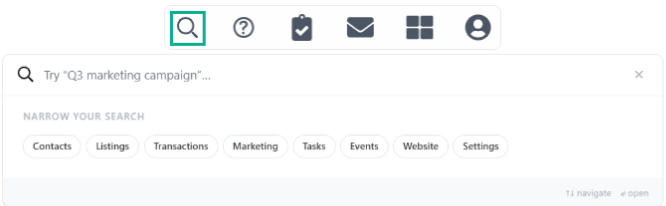
A new global search bar in the admin navigation lets you search for contacts, listings, transactions, tasks, settings, and more from one place.
Open global search by selecting the search icon in the header or using Cmd+K on Mac or Ctrl+K on Windows.
Search results are organized by category, and you can narrow results by selecting categories such as Contacts, Listings, or Settings. Your three most recent searches are saved for quick access. You can search listings by street address or MLS ID, and Settings results take you directly to the relevant page with the specific field highlighted.
Why it matters:
Find information and navigate the platform without clicking through multiple menus. Whether you're looking for a contact, tracking down a listing, or updating a setting, global search helps you get where you need to go faster.
Stay in the loop
We’ll publish Release Notes every month to keep you informed about what’s new and what’s next. Check back for monthly updates, and in the meantime, explore additional how-to guides and knowledge base articles to get the most out of your Lone Wolf tools.
Other resources
See more eBooks, webinars, and blog articles to help you stay ahead with strategies designed for your success.